
















1 March 2026
Ergonomic Office Chair Selection: Avoid These 5 Common Mistakes
In today's working conditions, we spend long hours at our desks, and choosing the right office chair is vital for our health and productivity. However, when making this critical decision, we often unknowingly make common mistakes. In this blog post, we will delve into 5 fundamental mistakes you might encounter during the ergonomic office chair selection process, explain step-by-step how to avoid them, and how to create your ideal workspace. Back pain, poor posture,

Quick Answer: When selecting an ergonomic office chair, it’s crucial to avoid common mistakes such as ignoring personal needs, underestimating adjustability features, compromising on quality, prioritizing aesthetics, and buying without trying. Always test the chair and prioritize your long-term health for the right choice.
Office chairs, an indispensable part of modern working life, now mean much more than just a place to sit. Especially considering long working hours, choosing the right ergonomic office chair directly affects many areas, from our back health to our overall posture, and even our work efficiency. However, when making such an important decision, unfortunately, many people make common mistakes, leading to long-term health problems and a lack of comfort. In this article, we will examine 5 common mistakes made when buying an ergonomic office chair, explain step-by-step how to avoid these mistakes, and how to create the most ideal workspace for yourself. Remember, the right office chair is not just a piece of furniture, but a valuable investment in your health and productivity. Knowing the effects of prolonged sitting on your body and the precautions you can take will help you better understand the importance of choosing the right chair, especially for those looking for quality turkey office furniture.
1. Mistake: Ignoring Personal Needs and Body Type
One of the biggest mistakes made when choosing an office chair is to search for a generic “good” chair and ignore personal body type, height, weight, or specific health needs. Every individual’s body structure is different, and these differences play a critical role in determining whether a chair is ergonomic. For example, a chair that provides adequate back support for a tall person might cause discomfort for a shorter user by preventing their feet from touching the floor. Similarly, someone with specific health issues like a herniated disc might need a chair that offers more customizable lumbar support instead of standard back support.
This mistake often stems from making hasty decisions or only gravitating towards popular brands. However, even the most expensive or highly recommended chair will not provide ergonomic benefits if it is not suitable for your body. Knowing your own body and making your chair selection accordingly makes a big difference in terms of long-term comfort and health. It’s not enough for the chair to be simply labeled “ergonomic”; it needs to be ergonomic for *you*. When considering turkey office furniture, always prioritize a personalized fit.
2. Mistake: Underestimating or Misunderstanding Adjustability Features
One of the most important features forming the basis of an ergonomic office chair is, undoubtedly, its adjustability capacity. However, many people either do not fully grasp the importance of these features or do not examine them in sufficient detail when choosing a chair. Thinking that a chair with only height adjustment is sufficient is a common mistake. Yet, truly ergonomic chairs offer many more adjustment points, and the correct use of these adjustments is vital for maximum comfort and support.
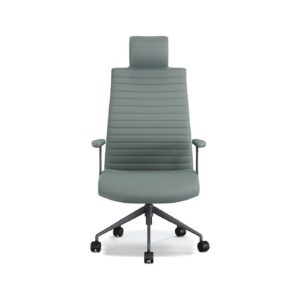
Features such as lumbar support height and depth, armrest height and angle, seat depth, lockable back tilt, and even headrest provide a personalized experience. These adjustments allow you to optimize the chair according to your body measurements and working posture. Not knowing how to use these adjustments or not giving them enough importance will prevent you from fully benefiting from the chair’s potential ergonomic advantages. Therefore, before purchasing a chair, you should definitely experience all adjustment mechanisms and understand how they work. Our guide on how to adjust lumbar support can provide you with detailed information on this matter, a key consideration for ergonomic office design.
- Step 1: Height Adjustment — Adjust the height so your feet are flat on the floor and your knees form a 90-degree angle.
- Step 2: Lumbar Support Adjustment — Adjust the height and depth of the lumbar support to cradle your lower back’s natural curve.
- Step 3: Seat Depth Adjustment — When your back is against the chair, ensure there’s a 2-3 finger gap between the back of your knees and the front edge of the seat.
- Step 4: Armrest Adjustment — Adjust the armrest height so your shoulders are relaxed and your elbows are at a 90-degree angle. Make sure your shoulders don’t shrug up when typing.
- Step 5: Back Tilt Adjustment — Find a tilt that makes your back comfortable and maintains your spine’s natural S-shape, and lock it if possible.
3. Mistake: Compromising on Quality and Materials
Ergonomic office chair selection